RedCloud Help

8.Service

8.1 四层负载均衡Service:概念、原理解读

8.1.1 为什么要有service?

在kubernetes 中,Pod 是有生命周期的,如果Pod 重启它的IP 很有可能会发生变化。如果我们的服务都是将Pod 的IP 地址写死,Pod 挂掉或者重启,和刚才重启的pod 相关联的其他服务将会找不到它所 关联的Pod,为了解决这个问题,在kubernetes 中定义了service 资源对象,Service 定义了一个服务 访问的入口,客户端通过这个入口即可访问服务背后的应用集群实例,service 是一组Pod 的逻辑集合, 这一组Pod 能够被Service 访问到,通常是通过Label Selector 实现的。

可以看下面的图:
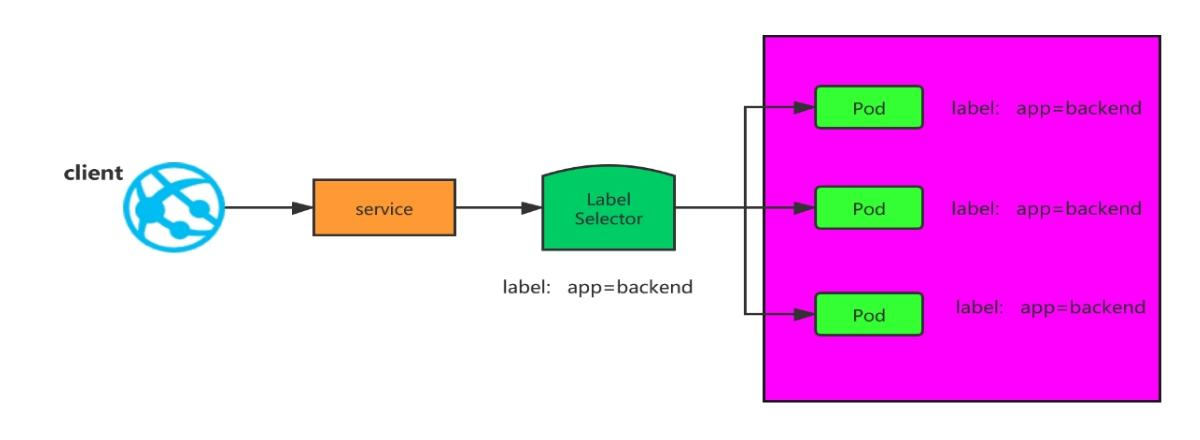
image_24.png
  1. pod ip 经常变化,service 是pod 的代理,我们客户端访问,只需要访问service,就会把请求 代理到Pod

  2. pod ip 在k8s 集群之外无法访问,所以需要创建service,这个service 可以在k8s 集群外访问的。

8.1.2 Service概述

service 是一个固定接入层,客户端可以通过访问service 的ip 和端口访问到service 关联的后端 pod,这个service 工作依赖于在kubernetes 集群之上部署的一个附件,就是kubernetes 的dns 服务 (不同kubernetes 版本的dns 默认使用的也是不一样的,1.11 之前的版本使用的是kubeDNs,较新的版 本使用的是coredns),service 的名称解析是依赖于dns 附件的,因此在部署完k8s 之后需要再部署dns 附件,kubernetes 要想给客户端提供网络功能,需要依赖第三方的网络插件(flannel,calico 等)。每 个K8s 节点上都有一个组件叫做kube-proxy,kube-proxy 这个组件将始终监视着apiserver 中有关 service 资源的变动信息,需要跟master 之上的apiserver 交互,随时连接到apiserver 上获取任何一 个与service 资源相关的资源变动状态,这种是通过kubernetes 中固有的一种请求方法watch(监视) 来实现的,一旦有service 资源的内容发生变动(如创建,删除),kube-proxy 都会将它转化成当前节点 之上的能够实现service 资源调度,把我们请求调度到后端特定的pod 资源之上的规则,这个规则可能 是iptables,也可能是ipvs,取决于service 的实现方式。

8.1.3 Service工作原理

k8s 在创建Service 时,会根据标签选择器selector(lable selector)来查找Pod,据此创建与 Service 同名的endpoint 对象,当Pod 地址发生变化时,endpoint 也会随之发生变化,service 接收前 端client 请求的时候,就会通过endpoint,找到转发到哪个Pod 进行访问的地址。(至于转发到哪个节 点的Pod,由负载均衡kube-proxy 决定)

8.1.4 kubernetes集群中有三类IP地址

  1. Node Network(节点网络):物理节点或者虚拟节点的网络,如ens33 接口上的网路地址

  2. Pod network(pod 网络),创建的Pod 具有的IP 地址

Node Network 和Pod network 这两种网络地址是我们实实在在配置的,其中节点网络地址是配置在 节点接口之上,而pod 网络地址是配置在pod 资源之上的,因此这些地址都是配置在某些设备之上的, 这些设备可能是硬件,也可能是软件模拟的

  1. 3、Cluster Network(集群地址,也称为service network),这个地址是虚拟的地址(virtual ip),没有配置在某个接口上,只是出现在service 的规则当中。

8.2 创建Service资源

kubectl explain service KIND: Service VERSION: v1 DESCRIPTION: Service is a named abstraction of software service (for example, mysql) consisting of local port (for example 3306) that the proxy listens on, and the selector that determines which pods will answer requests sent through the proxy. FIELDS: apiVersion <string> # service资源使用的api组 kind <string> #创建的资源类型 metadata <Object> # 定义元数据 spec <Object> status <Object>
kubectl explain service.spec KIND: Service VERSION: v1 RESOURCE: spec <Object> DESCRIPTION: Spec defines the behavior of a service. https://git.k8s.io/community/contributors/devel/sig-architecture/api-conventions.md#spec-and-status ServiceSpec describes the attributes that a user creates on a service. FIELDS: allocateLoadBalancerNodePorts <boolean> allocateLoadBalancerNodePorts defines if NodePorts will be automatically allocated for services with type LoadBalancer. Default is "true". It may be set to "false" if the cluster load-balancer does not rely on NodePorts. If the caller requests specific NodePorts (by specifying a value), those requests will be respected, regardless of this field. This field may only be set for services with type LoadBalancer and will be cleared if the type is changed to any other type. This field is beta-level and is only honored by servers that enable the ServiceLBNodePortControl feature. clusterIP <string> # 动态分配的地址,也可以自己在创建的时候指定,创建之后就改不了 clusterIPs <[]string> externalIPs <[]string> externalName <string> externalTrafficPolicy <string> healthCheckNodePort <integer> internalTrafficPolicy <string> ipFamilies <[]string> ipFamilyPolicy <string> loadBalancerClass <string> loadBalancerIP <string> loadBalancerSourceRanges <[]string> ports <[]Object> # 定义service端口,用来和后端pod建立关系 publishNotReadyAddresses <boolean> selector <map[string]string> # 通过标签选择器选择关联的pod有哪些 sessionAffinity <string> sessionAffinityConfig <Object> # Service在实现负载均衡的时候还支持sessionAffinity,sessionAffinity,默认是none,随机调度的(基于iptabels规则调度的);如果我们定义sessionAffinity的client ip,那就表示把来自同一客户端的ip请求调度到同一个pod上 type <string> 定义service类型

8.2.1 service 的四种类型

  1. ExternalName

适用于k8s 集群内部容器访问外部资源,它没有selector,也没有定义任何的端口和Endpoint。 以下Service 定义的是将prod 名称空间中的my-service 服务映射到my.database.example.com

kind: Service apiVersion: v1 metadata: name: my-service namespace: prod spec: type: ExternalName externalName: my.database.example.com

当查询主机 my-service.prod.svc.cluster.local 时,群集DNS 将返回值为 my.database.example.com 的CNAME 记录。

  1. CLusterIp

通过k8s 集群内部IP 暴露服务,选择该值,服务只能够在集群内部访问,这也是默认的 ServiceType。

  1. NodePort

    通过每个Node 节点上的IP 和静态端口暴露k8s 集群内部的服务。通过请求: 可 以把请求代理到内部的pod。Client----->NodeIP:NodePort----->Service Ip:ServicePort---->PodIP:ContainerPort。

  2. LoadBalancer

使用云提供商的负载均衡器,可以向外部暴露服务。外部的负载均衡器可以路由到NodePort 服务和 ClusterIP 服务。

8.2.2 Service的端口

KIND: Service VERSION: v1 RESOURCE: ports <[]Object> DESCRIPTION: The list of ports that are exposed by this service. More info: https://kubernetes.io/docs/concepts/services-networking/service/#virtual-ips-and-service-proxies ServicePort contains information on service's port. FIELDS: appProtocol <string> name <string> #定义的端口名字 nodePort <integer> #宿主机上映射的端口,比如一个Web 应用需要被k8s 集群之外的其他用户访问,那么需要配置 type=NodePort,若配置nodePort=30001,那么其他机器就可以通过浏览器访问scheme://k8s 集群中的 任何一个节点ip:30001 即可访问到该服务,例如http://192.168.1.63:30001。如果在k8s 中部署 MySQL 数据库,MySQL 可能不需要被外界访问,只需被内部服务访问,那么就不需要设置NodePort port <integer> -required- # Service 的端口,这个是k8s集群内部服务可访问的端口 protocol <string> targetPort <string> # targetPort 是pod 上的端口,从port 和nodePort 上来的流量,经过kube-proxy 流入到后端pod 的targetPort 上,最后进入容器。与制作容器时暴露的端口一致(使用DockerFile 中的EXPOSE),例如 官方的nginx 暴露80 端口。

8.3 创建service:type类型是ClusterIP

8.3.1 创建pod

apiVersion: apps/v1 kind: Deployment metadata: name: my-nginx spec: selector: matchLabels: run: my-nginx replicas: 2 template: metadata: labels: run: my-nginx spec: containers: - name: my-nginx image: nginx imagePullPolicy: IfNotPresent ports: - containerPort: 80 #pod 中的容器需要暴露的端口

需要注意的是,pod 虽然定义了容器端口,但是不会使用调度到该节点上的80 端口,也不会使用任 何特定的NAT 规则去路由流量到Pod 上。 这意味着可以在同一个节点上运行多个 Pod,使用相同的容器 端口,并且可以从集群中任何其他的Pod 或节点上使用IP 的方式访问到它们。

如果pod 被删除了,重新生成的pod ip 地址会发生变化,所以需要在pod 前端加一个 固定接入层。接下来创建service:

8.3.2 创建Service

8.3.2.1 创建clusterIp

# 查看pod标签 kubectl get pods --show-labels
apiVersion: v1 kind: Service metadata: name: my-nginx labels: run: my-nginx spec: type: ClusterIP ports: - port: 80 #service 的端口,暴露给k8s 集群内部服务访问 protocol: TCP targetPort: 80 #pod 容器中定义的端口 selector: run: my-nginx #选择拥有run=my-nginx 标签的pod

上述yaml 文件将创建一个 Service,具有标签run=my-nginx 的Pod,目标TCP 端口 80,并且在一个抽象的Service 端口(targetPort: 容器接收流量的端口;port:抽象的 Service 端口,可以使任何 其它 Pod 访问该 Service 的端口)上暴露。

这种方式外部无法访问,如果想要在k8s集群之外访问,是需要把service 的type类型改为nodePort的

# 查看service详细信息 kubectl describe svc my-nginx kubectl get ep my-nginx

service 可以对外提供统一固定的ip 地址,并将请求重定向至集群中的pod。其中“将请求重定向 至集群中的pod”就是通过endpoint 与selector 协同工作实现。selector 是用于选择pod,由 selector 选择出来的pod 的ip 地址和端口号,将会被记录在endpoint 中。endpoint 便记录了所有pod 的ip 地址和端口号。当一个请求访问到service 的ip 地址时,就会从endpoint 中选择出一个ip 地址 和端口号,然后将请求重定向至pod 中。具体把请求代理到哪个pod,需要的就是kube-proxy 的轮询实 现的。service 不会直接到pod,service 是直接到endpoint 资源,就是地址加端口,再由endpoint 再 关联到pod。

service 只要创建完成,我们就可以直接解析它的服务名,每一个服务创建完成后都会在集群dns 中 动态添加一个资源记录,添加完成后我们就可以解析了,资源记录格式是:

SVC_NAME.NS_NAME.DOMAIN.LTD. 服务名.命名空间.域名后缀 集群默认的域名后缀是svc.cluster.local. 就像我们上面创建的my-nginx 这个服务,它的完整名称解析就是 my-nginx.default.svc.cluster.local

8.3.2.2 创建NodePort类型

8.3.2.2.1 创建deployment
apiVersion: apps/v1 kind: Deployment metadata: name: my-nginx-nodeport spec: selector: matchLabels: run: my-nginx-nodeport replicas: 2 template: metadata: labels: run: my-nginx-nodeport spec: containers: - name: my-nginx-nodeport-container image: nginx imagePullPolicy: IfNotPresent ports: - containerPort: 80
kubectl apply -f pod_nodeport.yaml
8.3.2.2.2 创建service 代理pod
apiVersion: v1 kind: Service metadata: name: my-nginx-nodeport labels: run: my-nginx-nodeport spec: type: NodePort ports: - port: 80 protocol: TCP targetPort: 80 nodePort: 30380 selector: run: my-nginx-nodeport
kubectl apply -f service_nodeport.yaml

服务请求走向:Client-→node ip:30380->service ip:80-→pod ip:container port Client ->192.168.1.63:30380->10.100.156.7:80->pod ip:80

8.3.2.3 创建ExternalName

apiVersion: apps/v1 kind: Deployment metadata: name: client spec: replicas: 1 selector: matchLabels: app: busybox template: metadata: labels: app: busybox spec: containers: - name: busybox image: busybox command: [ "/bin/sh","-c","sleep 36000" ]
apiVersion: v1 kind: Service metadata: name: client-svc spec: type: ExternalName externalName: nginx-svc.nginx-ns.svc.cluster.local ports: - name: http port: 80 targetPort: 80

#该文件中指定了到 nginx-svc 的软链,让使用者感觉就好像调用自己命名空间的服务一样。 #查看pod 是否正常运行

apiVersion: apps/v1 kind: Deployment metadata: name: nginx namespace: nginx-ns spec: replicas: 1 selector: matchLabels: app: nginx template: metadata: labels: app: nginx spec: containers: - name: nginx image: nginx imagePullPolicy: IfNotPresent
apiVersion: v1 kind: Service metadata: name: nginx-svc namespace: nginx-ns spec: selector: app: nginx ports: - name: http protocol: TCP port: 80 targetPort: 80
kubectl exec -it client-5c75576967-7hqlg -- /bin/sh wget -q -O - client-svc.default.svc.cluster.local wget -q -O - nginx-svc.nginx-ns.svc.cluster.local

上面两个请求结果是一样的。

13 February 2026